Access Solutions Enrollment Experience UAPI
External - Support
Below are the areas/use-cases where you can get support for this API
- Acquiring access to the API Sandboxes
- Reporting a bug or an incident
- Requesting new features
- Implementation guidelines and best practices
- FAQ
Acquiring access to the API Sandboxes:
Submitting API Access Request: Only registered users are entitled to submit an access request for an API. If not registered yet, use the following link to first register and get valid credentials(user id and password) to login. Then follow the steps explained below:
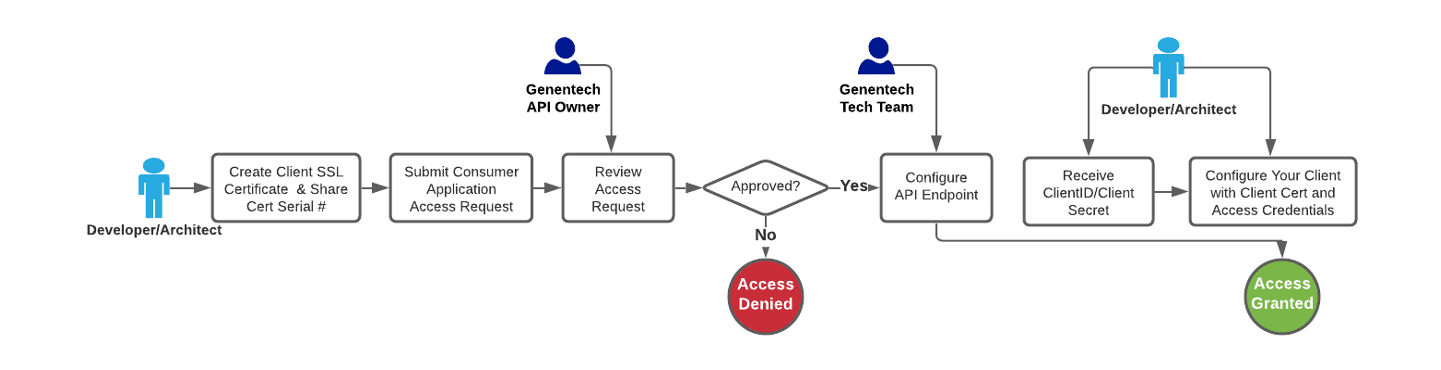
STEP 1: Obtain a valid client certificate and share the serial number with Genentech during creation of access request as shown at STEP2. Click here for more information.
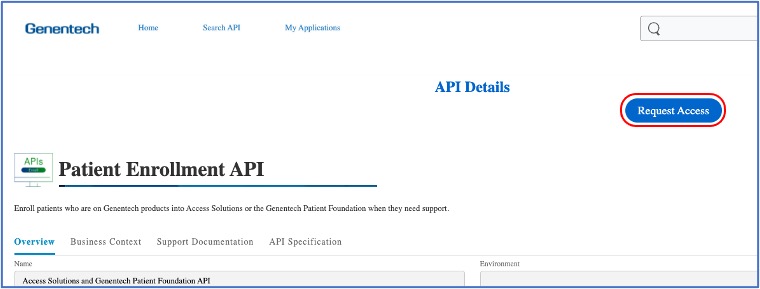
STEP 2: On the API Details page click the “Request Access” button and fill the form. See sample screenshots below:
Follow the access request wizard screens:
| Wizard Screen | Hint |
|---|---|
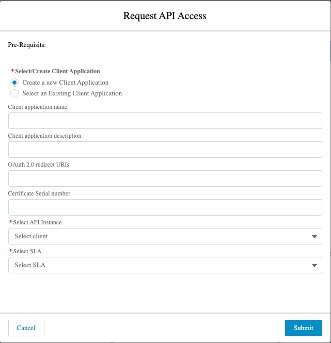 | - Give a reasonable name for your application. This will show up in your My Apps section once approved. - Please obtain the serial number of your client certificate which you have acquired at STEP 1 - This field is not mandatory, but you can provide your app’s URL here if you like. - Please provide a brief description of your application. - This field is mandatory. Please refer to [OAuth 2.0 guidelines][1] for additional info. - Select the target environment you seek access for - Select the relevant SLA Tier(i.e. Gold) - Provide a reason why you need access using this SLA Tier. |
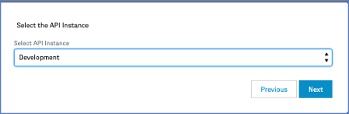 | - Select the target environment you seek access for |
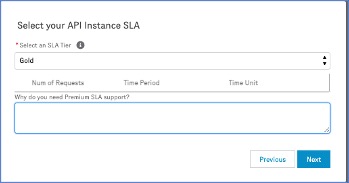 | - Select the relevant SLA Tier(i.e. Gold) - Provide a reason why you need access using this SLA Tier. |
STEP 3: Genentech API Owner will review your request and either approve or reject. You should receive a status update in the next 2 business days. Sometimes, the API Owner might require additional info before approving your request.
STEP 4: Once approved Genentech API Platform team will provision the access for the end point you have selected during your request. Typically this takes 2 business days to complete. So even if you get an immediate approval email, your credentials and certificate will work only after this step is completed.
STEP 5: Once you receive the approval email you will be able to manage your app and obtain clientid and client secret via the management panel. To do so you need to login to the API MarketPlace portal. See screenshot below:
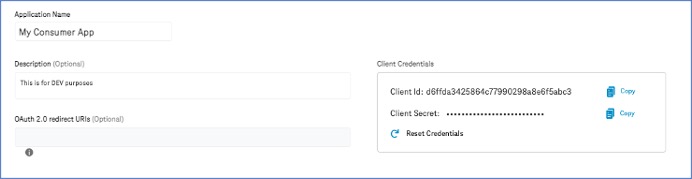
STEP 6: When making a request the client id and client secret must be provided as part of basic authentication & in the header parameters:
- client_id
- client_secret
The Client SSL certificate must also be provided.
Reporting a bug or an incident
If you encounter an error during your Dev/Test or in Prod, you can use the following form to submit a support request. In the form please provide all the required fields as described below:
- Short description - which will become the Incident title
- Description - which should contain a detailed description of the issue
- Sandbox Environment - Choose between DEV/TEST or PROD
- Urgency - which will define the priority level of the Incident
- Level 1 - Critical: Business stopping and no acceptable workaround. Imminent threat to key business or near term business milestones posing financial risk.**
- Level 2 - Urgent: Key business impacting, no workaround.
- Level 3 - High: Key business impacting with workaround, OR non-key business impacting no workaround.
- Level 4 - Medium: Non-key business impacting with workaround, OR not business impacting.
- -Affected API and Consumer Application- Your app name and the API you are calling.
- -(optional) Attachments - any attachments (if applicable) might help to speed up the resolution of the issue, e.g. screenshots, error details, logs from the affected system/application
Requesting new features
If you have any feedback about usability of the API in terms of enhancement or a new feature you can use the Contact Us form to share your thoughts/ideas. This will be reviewed by the API Owner and the business team and you will receive a response regarding your feedback. In some cases new features/enhancement requests could be added to the roadmap for a specific version of the API.
Implementation guidelines and best practices
For technical details on the implementation of Enrollment API to integrate with Genentech please see the FHIR Implementation Guide: http://fhir.developer.gene.com/index.html